Styling your pages
To customise the appearance of the different stages of the posting process to complement your own platform's native UI, you can provide CSS files to style the following components:
1. First posting step - Universal Posting Page (UPP)
The main Universal Posting Page, UPP, is the initial step of the posting process. To style this page, you need to provide us with a single CSS file.
2. Second posting step - Post Completion Page (PCP)
The second step of the posting process involves the entry of extra fields into the PCP. To style this step, you also need to provide us with a single CSS file.
3. Success message
After completing the posting process successfully, a static HTML page displays a success message. By default, this message reads: "Thank you for finishing the posting. We will send you an email if any of the postings encounter any issues."
Achieving various styling results
You have the flexibility to achieve different styling results by customising the CSS files. Below is a very basic example of an alternatively styled page:
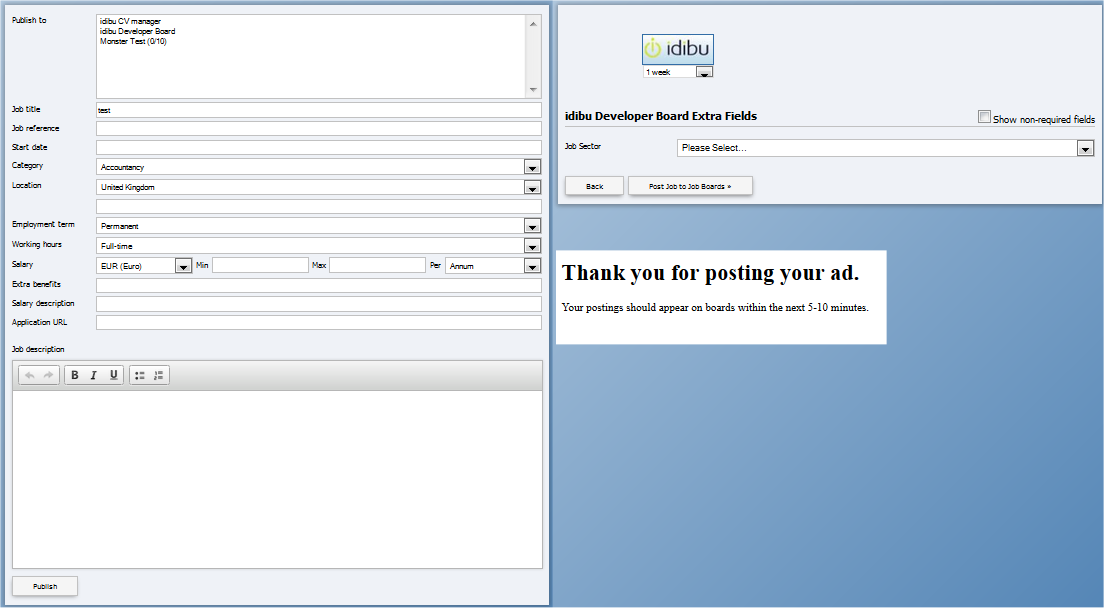
Example styling files
The default styling for both the Universal Posting Page (UPP) and the Post Completion Page (PCP) is controlled by the following files. You can use these as a base to create your customised styling: Styling.zip
Adding or updating your styling
Just follow these steps:
- Prepare Your Styling: Ensure you have the necessary CSS files and static HTML page ready for UPP, PCP, and 'Success message' customisation.
- Contact Us: Send your customized styling files to us via your idibu Partner Manager or Support contact. You'll need to specify your
Partner ID, which is typically provided during your onboarding. - Integration: Once uploaded, your customised styling will be integrated and applied to your UPP, PCP, and Success page. Be sure to include your Partner ID parameter at the end of the URL, such as
=partnerID - If you need to make any changes, just update accordingly and send us the new files.
If you have any questions about the styling process, then don't hesitate to let us know. We're here to help you develop a seamless posting experience for your customers.