Partner AdManager
Alongside the Universal Posting Page, idibu provides a simple-to-use 'AdManager' interface which can also be fully styled using CSS to complement the job posting functionality and sit natively within the partner platform.
The AdManager is an iframe-ready tool that allows the end-user to efficiently manage an individual job ad across all Portals that it was originally posted to.
Here's an example of the core functionality, which allows for reposting, quick repost (refresh), and deletion of the selected advert:
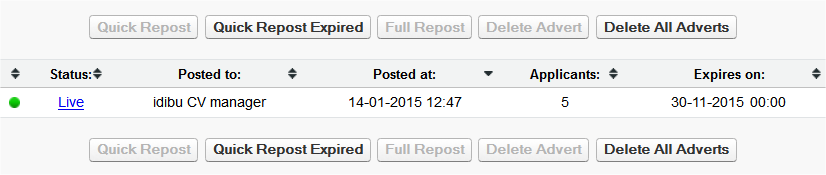
Please note that the AdManager does not display the status of all ads posted by a given customer, but only the one selected. In most cases, the AdManager is made accessible to the recruiter alongside the 'Post Jobs' tab in the partner's UI. To ensure correct usage, please make sure Job References remain unique across all adverts (jobs) on each account.
Functionality
Indicators
- Status
- Live - Successfully posted. There may be a clickable link to view the ad on the website if the job board supports this.
- Failed - Something went wrong when posting the ad. If it is a known issue, we'll send some helpful guidelines to the user on how to fix the problem.
- Expired - When the post reaches its expiry date.
- Deleted - Successfully removed.
- Posted to - The name of the website on which the advert has been posted / deleted.
- Posted at - The exact time of the posting / deletion, in UK timezone.
- Applicants - Total number of candidates from the particular website. Please note that this will only show the number of applications if you are using Aptrack and the website in question supports this feature.
- Expires on - When the post will expire on the website, in the London timezone.
Actions
- Quick Repost - Reposts the selected advert with exactly the same details in one click.
- Quick Repost Expired - Quick reposts all currently expired posts, allowing to refresh the job on all websites with just a single click.
- Full Repost - Allows to repost the selected advert and amend some details on the way, just like when posting a new job, but with all the previous data pre-filled.
- Delete Advert - Removes a particular post from the website (provided the website supports such functionality).
- Delete All Adverts - Same as above, but for all applicable posts (ones that are currently active on websites that support deleting).
Generating the Admanager
Endpoint
https://www.idibu.com/clients/pam/index.php
Parameters
h- (required) - posting account's hashref- (required) - reference of the job to manageins- (required) - the repost link. You can use this in your software to generate your repost page, similar to when posting a new ad. By default, two parameters will be added to the provided URL:J- job IDM- will take the value ofR, which stands for "REPOST" (refer to this article for more info)
noRepostParameters- (optional) - if set totrue, noJandM=Rparameters will be appended to theinsURL on full repost. Please set this totrueif you're redirecting to UPP. When reposting via UPP, remember to use thefindJob=trueparameter within theinsURL instead.sameWindow- (optional) - if set totrue, the Full Repost action will open a page in the current window instead of a new tabs- (optional) - your partner ID if you wish to utilize custom styling
Managing and Reposting the ads
You can use the Advert Management Webservice and Job Management Webservice to obtain all the posting's details (such as title, description, etc.) and fill in more data inside your software based on that.
It's even easier with UPP - simply by inserting it as the ins parameter. For example:
https://www.idibu.com/clients/pam/index.php?h=ACCOUNT_HASH&ref=JOB_REFERENCE&noRepostParameters=true&ins=https%3A%2F%2Fwww.idibu.com%2Fclients%2Fupp%2Findex.php%3Fhash%3DACCOUNT_HASH%26jobRef%3DJOB_REFERENCE%26useOriginalSender%3Dtrue%26findJob%3Dtrue
This would generate an Admanager with a repost-ready UPP under the "Full Repost" button, with all the original details of the posting already pre-filled.